


TradingView API Integration: Use Cases, Costs, and Alternatives for Trading Platforms

September 23, 2026
- TradingView does not offer a public API for pulling market data or indicator values — only partner broker APIs, charting libraries, and webhook alerts.
- Advanced Charts, Lightweight Charts, the Broker API, and webhook alerts are four different products with different access models and costs.
- The charting libraries are free; the real cost is market data, Datafeed engineering, and exchange redistribution fees for real-time quotes.
- The online trading platform market is valued at $11.7 billion in 2026 and projected to grow at a 7.9% CAGR through 2033.
- Scope charting, broker execution, and alert automation separately before anyone estimates the ticket.
Every trading platform roadmap has a line item that says “TradingView integration, 2 weeks.” Most of them are wrong. Teams scope it as one API call and end up building a broker connection, a market data pipeline, and a compliance review instead, usually after the deadline has already slipped.
Get this decision right early, and you save months. Get it wrong, and you find out the hard way that TradingView never had the API you thought it did.
Does TradingView Have an API? What’s Actually Available
Let’s clear up the confusion before anything else, because it shapes every decision that follows.
The Official Answer
TradingView does not offer a public API for pulling market data or indicator values. TradingView itself confirms this directly:
We don’t have an API that gives access to data as of now, but we are planning to add it in the future.
That single sentence answers most of what people mean when they search for “trading view api.” There’s no general-purpose REST endpoint you can call with a symbol and a date range and get candles back. If your product spec says “pull live TradingView data via API,” that spec is wrong, and it’s worth flagging before anyone estimates the ticket.
Why the Confusion Persists
Part of the problem is that TradingView genuinely does run a REST API internally. It powers the broker-execution workflow, and it’s documented, but only for approved brokerage partners under a signed integration agreement. It was never meant for general market data access, and treating a partner-only spec as a public one is where a lot of misinformed tutorials and paid “API key” resellers come from.
What TradingView Offers Instead
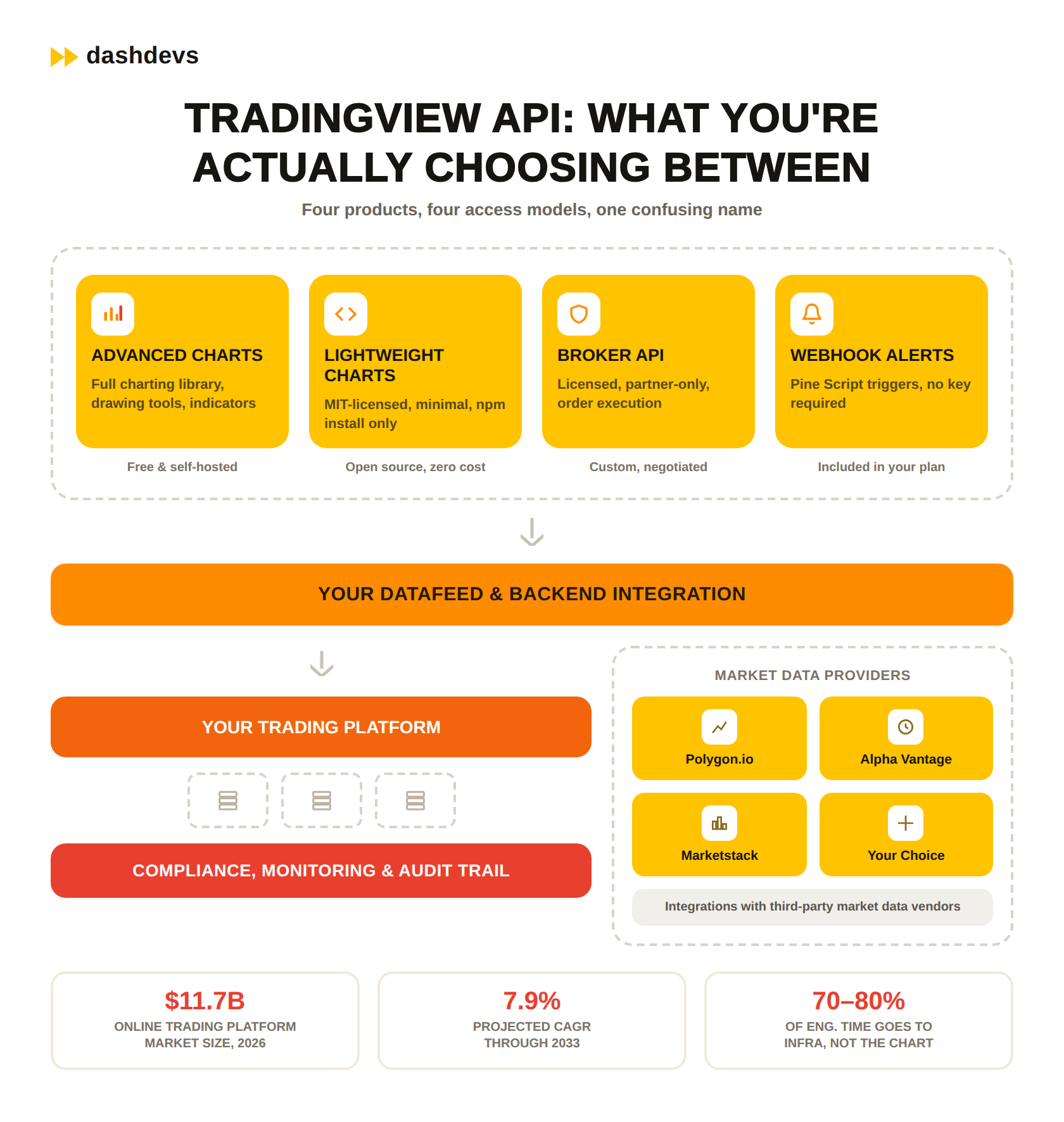
So if there’s no public data API, what is everyone actually integrating? Four distinct products get lumped under “the TradingView API,” and each one has a different access model, license, and engineering footprint:
| Product | What it is | Access model |
|---|---|---|
| Advanced Charts (Charting Library) | Self-hosted charting engine you embed and connect to your own data source through a defined datafeed interface | Free after application and approval |
| Lightweight Charts | Open-source (MIT) HTML5 canvas charting library on npm — simpler, no broker or watchlist features | Free, no application process |
| Broker API | Partner-only REST integration for licensed brokerages to place trades from a TradingView-powered terminal | Licensed partnership |
| Webhook alerts and Pine Script | Trigger your own systems when a chart condition fires | Included with a TradingView plan |
Confusing Advanced Charts with Lightweight Charts alone causes real scoping errors. Teams that need a simple price chart with no drawing tools or broker features often over-engineer against Advanced Charts, apply for access they didn’t need, and burn a review cycle they could have skipped by using Lightweight Charts instead.
Pro tip: If a course, marketplace, or forum post sells “lifetime TradingView API access,” that’s a resold or scraped feed wearing TradingView’s name. Ask for the exact endpoint documentation before paying for anything described that way, and check whether it’s actually Advanced Charts, a data vendor, or nothing verifiable at all.
How to Get a TradingView API Key
Once you know which product you actually need, the access process looks different for each one.
Advanced Charts Access
There is no single TradingView API key that unlocks everything, because there is no single API. For Advanced Charts, you submit an application through TradingView’s own form describing your product and domain, and TradingView’s team reviews it before granting access to the private GitHub repository. Expect them to ask what the product is, whether it’s live or in development, and how you intend to source data.
It’s free to use once approved, but the license agreement restricts you to public-facing websites and apps, not internal tools, and TradingView reserves the right to reject applications that look like an attempt to resell TradingView’s own data or branding.
Broker API Access
For the Broker API, the process is heavier and closer to a partnership than a signup. You need a licensed brokerage relationship with TradingView, and the integration itself follows a defined REST and JSON specification covering account balances, positions, order placement, order status, and execution reports. Pricing and commercial terms are negotiated directly and aren’t published, which is standard for infrastructure aimed at regulated brokers rather than app developers.
Webhook Alerts
For webhook alerts, there’s no key in the traditional sense. You set a webhook URL inside your TradingView alert configuration, and TradingView POSTs a JSON payload to that endpoint when the alert condition fires. Your server is responsible for authenticating that request, since TradingView doesn’t sign or encrypt the payload by default.
Pro tip: Whitelist TradingView’s published webhook IP ranges on your endpoint, and add your own shared-secret check inside the payload body. Without it, anyone who guesses or leaks your webhook URL can fire fake trade signals at your automation layer. We’ve seen this exact gap turn a working strategy into a liability during a security review.
TradingView API Documentation: What You’ll Actually Work With
Getting access is only step one. What you do with it depends on reading the right documentation, and there’s more than one set.
Advanced Charts Documentation
TradingView’s real documentation lives in several separate places, and mixing them up is the single most common early mistake teams make. The Advanced Charts documentation covers the Charting Library, Datafeed, and Broker modules, with TypeScript definition files (charting_library.d.ts, datafeed-api.d.ts, broker-api.d.ts) as the actual contract your code implements.
The Datafeed interface specifically requires you to implement onReady, searchSymbols, resolveSymbol, getBars, and subscribeBars (or subscribeDepth if you’re streaming order book data). Get resolveSymbol wrong — meaning the symbol metadata you return doesn’t match what TradingView expects for pricing precision, session hours, or timezone — and every chart built on it will silently show incorrect data rather than throwing a visible error. This is the failure mode that burns the most QA time on real projects.
Pine Script and Alerts Documentation
Separately, TradingView’s help center documents Pine Script and alert webhooks, a completely different workflow aimed at automation rather than charting. Alert payloads support placeholders like {{strategy.order.action}}, {{ticker}}, and {{close}}, which get substituted at fire time, and getting the JSON template wrong here is a common source of silently dropped automated trades. Read the Datafeed module spec closely before you scope a project. Teams that skip it tend to rebuild their data layer twice.
Pro tip: Pin your Charting Library version and read the changelog before every upgrade. TradingView has shipped breaking changes to the Datafeed interface between major versions before, and an unplanned upgrade can silently change how
getBarspaginates or how symbol resolution behaves.
7 Use Cases for TradingView API Integration
Here’s where the pieces above actually get used in production trading and investment products.
1. Embedding Advanced Charts in Your Own Trading App
The most common use case by far. You keep your own backend, your own accounts, and your own order flow, and you use Advanced Charts purely for the visual layer: candlesticks, indicators, drawing tools, and multi-timeframe views. The engineering work concentrates almost entirely in the datafeed layer, not the UI.
2. Connecting Your Own Market Data Through the Datafeed API
Advanced Charts doesn’t come with data. You implement the Datafeed interface to feed it your own prices, whether that’s from an exchange feed, a licensed data vendor, or your own matching engine, and you’re responsible for handling reconnects, exchange session hours, and adjusted-versus-unadjusted pricing around corporate actions like splits and dividends.
3. Broker-Side Order Execution
If you’re a licensed broker, the Broker module lets a user place, modify, and cancel orders directly from the chart, without leaving the TradingView-powered interface. Your backend needs to keep positions, balances, and order status in sync with TradingView’s UI in near real time, which means this integration carries more state-management complexity than any of the others on this list.
4. Semi-Automated Strategies via Pine Script and Webhooks
A trader builds a Pine Script strategy, sets an alert condition, and that alert fires a webhook to a server that places the trade elsewhere, often through a broker’s own REST API like Interactive Brokers or a crypto exchange. This is the closest thing to “using the TradingView API” that most retail and prop trading tools actually build against, and it’s also the path most exposed to replay attacks if the webhook isn’t authenticated properly.
5. Multi-Asset Dashboards
Crypto exchanges, forex brokers, and multi-asset brokerages use Advanced Charts to give every asset class the same charting experience, while routing crypto data, FX data, and equities data through separate backend feeds behind the scenes. Symbol mapping across those feeds — so that BINANCE:BTCUSDT and a traditional equity ticker behave consistently inside one datafeed implementation — is the part vendors rarely mention until you’re mid-build.
6. White-Label Trading Terminals
Prop firms and smaller brokerages license Advanced Charts to build a terminal that looks and feels like TradingView, under their own brand, without building a charting engine from zero. This is usually paired with the Broker API so the terminal isn’t just a chart, it’s a full execution surface.
7. Investment Analytics Platforms
Wealth management and investment platforms embed charting for portfolio visualization, layering their own analytics, risk scoring, and recommendations on top of a familiar charting interface. Here the Broker module is often skipped entirely since there’s no direct execution, and the integration effort shifts toward custom overlays and annotation layers instead.
Pro tip: Before picking a use case, map it against your actual compliance perimeter. A pure charting embed and a broker-side order execution feature carry completely different audit and licensing obligations, even though both start from the same Advanced Charts library.
TradingView API Pricing, Cost, and Free Tier: What You’ll Actually Pay
Now for the question every stakeholder actually cares about. The honest answer is that there isn’t one number.
What Each Product Actually Costs
TradingView API pricing isn’t one number, because you’re really pricing four separate products.
| Product | TradingView API cost | What drives it |
|---|---|---|
| Advanced Charts | Free to use, self-hosted | Your own hosting and data feed costs |
| Lightweight Charts | Free, open source (MIT) | No licensing cost at all, fewer features |
| Broker API | Custom, licensed | Negotiated per brokerage relationship |
| Webhook alerts | Free (included with a TradingView plan) | Your TradingView subscription tier |
Where the Real Cost Hides
The table above looks reassuring. The real budget conversation starts once you look past it. The TradingView API free tier, in practical terms, is Advanced Charts and Lightweight Charts themselves. There’s no licensing fee for either library, which is why they show up in so many trading apps. Your actual TradingView API price shows up elsewhere: the market data you feed into it, the engineering time to implement the Datafeed spec correctly, and the ongoing maintenance as TradingView ships new library versions.
That’s the detail most vendor comparisons skip. A free charting library still needs a paid, reliable data source behind it, and if you need real-time (not delayed) exchange data, you’re also looking at exchange market-data agreements and redistribution fees on top of whatever your data vendor charges — a cost line that catches first-time fintech founders off guard more often than the engineering budget does.
The online trading platform market itself is growing fast enough that this cost line isn’t shrinking: it’s valued at $11.7 billion in 2026 and projected to grow at a 7.9% CAGR through 2033, according to Grand View Research’s online trading platform market report. More platforms competing for the same traders means data quality and execution speed are becoming real differentiators, not backend details nobody notices.
Pro tip: Ask your market data vendor for their exchange redistribution fee schedule before you sign, not after. Real-time equity data almost always carries a separate per-exchange fee that isn’t part of the vendor’s advertised subscription price, and it’s the line item that blows up budgets late in a project.
Alternatives to the TradingView API for Market Data
Since the charting layer is free but the data behind it isn’t, most teams end up shopping for a data provider anyway. Here’s how the field actually breaks down.
Comparing the Main Providers
Since TradingView doesn’t supply market data through an API, most integrations pair Advanced Charts, or Lightweight Charts, with a dedicated data provider. Here’s how the main options compare on cost, based on a 2026 market data API comparison from apilayer:
| Provider | Free tier | Starting paid plan | Best fit | | — | — | — | | Polygon.io | 5 calls/minute | $29/month (delayed data), $199/month (real-time) | US equities, WebSocket streaming | | Alpha Vantage | 25 requests/day | $49.99/month | Prototyping, historical time series | | Marketstack | 100 requests/month | $9.99/month | Broad global exchange coverage on a budget |
Latency matters as much as price here. Polygon’s WebSocket feed suits subscribeBars implementations that need sub-second updates, while a REST-only provider like Alpha Vantage is fine for a research dashboard but will visibly lag on an active trading chart under getBars polling.
Charting Alternatives
Data is only half the stack. The charting engine itself has options too. For charting, TradingView’s Advanced Charts remains one of the best free charting software options on the market, largely because it’s the same engine millions of retail traders already recognize, which shortens the learning curve for your own users. The tradeoff is the application and approval step, plus the public-website licensing restriction. Lightweight Charts removes that friction entirely, at the cost of built-in drawing tools, indicators, and the broker/watchlist ecosystem Advanced Charts ships with.
Pro tip: Test a provider’s WebSocket reconnect behavior under a simulated network drop before you commit to it. A feed that silently stops pushing updates after a disconnect is worse than one that visibly errors out, because your chart keeps looking fine while the price underneath it goes stale.
What This Looks Like in Practice
Frameworks and specs are useful, but two real projects show how differently this plays out depending on what the product actually needs.
A Trading Platform Where Data Throughput Was the Real Problem
For a digital assets trading platform, the charting layer was never the hard part. Our work building a digital asset trading platform focused on the datafeed and matching layer behind it, engineered to handle over 30,000 transactions per second under EMI and VASP compliance requirements. Advanced Charts can render candles instantly; it can’t compensate for a matching engine that falls behind under load, so the real engineering budget went into throughput, not the UI layer people assume is the hard part.
An Investment Platform Where Analytics Carried the Differentiation
For a different client, the charting interface stayed close to standard. Our investment analytics platform project put the engineering effort into the intelligence layered on top: portfolio analytics, risk insights, and recommendations built around the chart rather than inside it. The datafeed here prioritized historical depth and corporate-action accuracy over sub-second latency, since the product’s edge was analysis, not execution speed.
Neither project treated “get the TradingView API” as the actual task. Both treated it as one component inside a larger real-time trading platform development effort, where the data layer and compliance requirements did the heavy lifting.
Pro tip: Score your own project the same way we scored these two. Ask whether the data layer or the UI layer is where your real complexity lives, then staff your best engineers against that answer instead of the part of the build that looks hardest on a slide.

How to Plan a TradingView API Integration Project
With the products, the costs, and two real examples on the table, here’s how to turn that into an actual project plan.
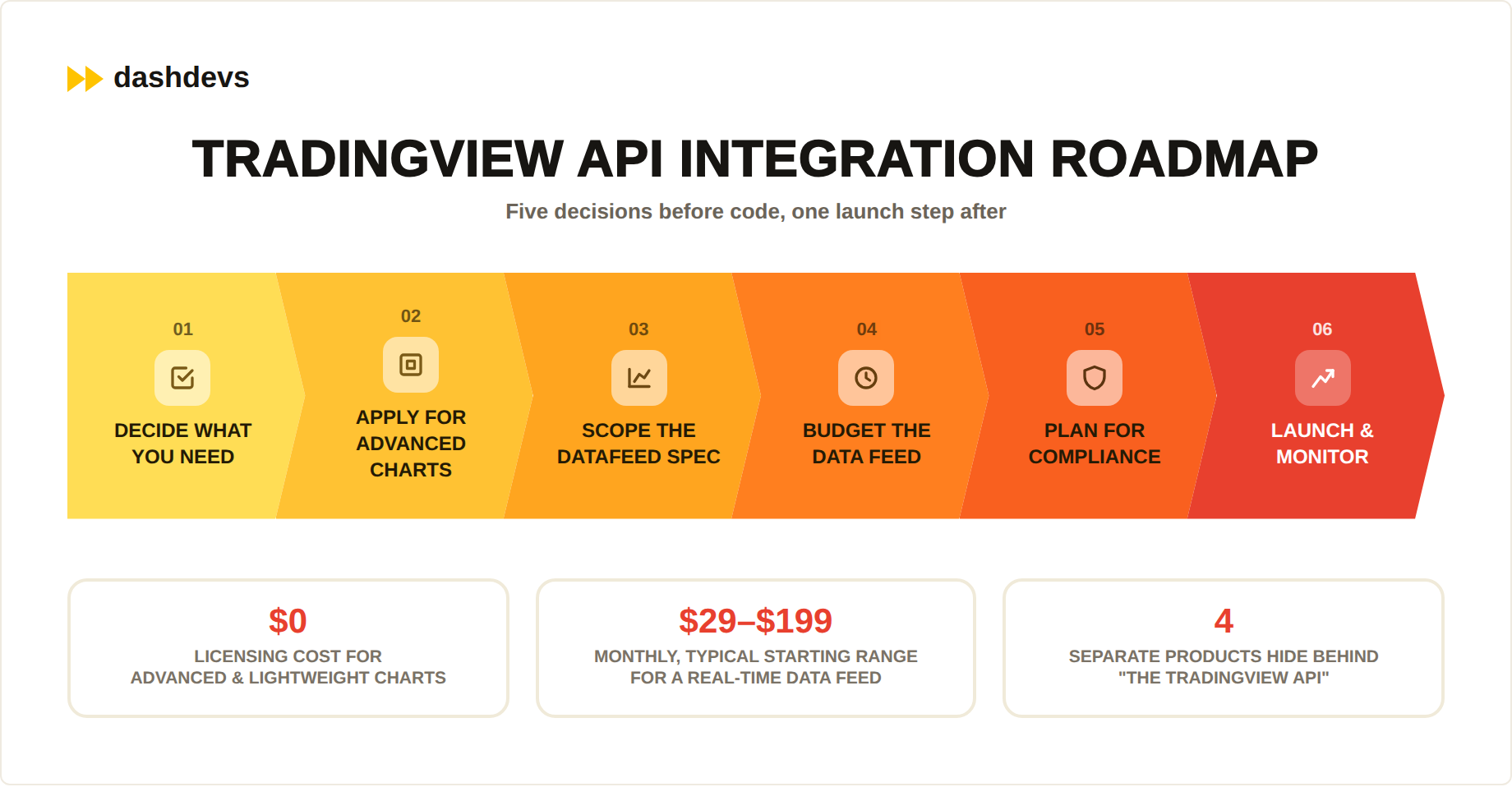
Five Steps Before You Write Code
- Decide what you actually need. Charting only, broker execution, or automation through alerts. These are four different products, not one API, and each one has a different application process and timeline.
- Apply for Advanced Charts access early, if you need it. The approval step can take longer than the integration itself, so start it in parallel with backend planning, or use Lightweight Charts if you don’t need the full feature set.
- Scope your Datafeed implementation against the real spec. Build against
datafeed-api.d.ts, implementresolveSymbolandgetBarscorrectly from day one, and test against real exchange session hours and holidays instead of guessing at the format. - Budget for a market data subscription separately. Whatever you choose from the alternatives above, treat it as its own line item, including any exchange redistribution fees for real-time data, not an afterthought to the charting cost.
- Plan for compliance from the start if you’re handling real trades. A broker-side integration touches licensing, best-execution obligations, order routing, and audit trail requirements that a pure charting embed never does.
Build vs Buy for the Wider Platform
The five steps above cover the integration itself. Zoom out one level, and there’s a bigger question worth asking before any of them. If you’re weighing whether to build this whole stack in house, our guide on how to build a trading platform from scratch walks through the wider architecture decisions, and our breakdown of stock trading app development costs covers the budget side in more depth.
Pro tip: Start your Advanced Charts application the same week you kick off backend planning. Review times vary, and there’s no reason to let an approval queue sit on your critical path when it can run in parallel with everything else.
Common Mistakes to Avoid
Most of what goes wrong on these projects falls into one of two buckets.
Technical Mistakes
Assuming “API” means market data. The single biggest source of wasted engineering time. Confirm which of the four TradingView products you actually need before writing a line of code.
Treating the Datafeed spec as optional documentation. It isn’t. Skipping it leads to charts that render incorrectly under real trading volume, not just in a demo, and resolveSymbol errors in particular tend to fail silently rather than throw.
Skipping WebSocket reconnect logic. subscribeBars implementations that don’t handle dropped connections gracefully will show stale prices on a chart that looks perfectly fine, which is worse than an obvious outage because nobody notices until a user complains.
Cost and Planning Mistakes
Underestimating the data feed cost. Advanced Charts and Lightweight Charts are both free. The market data behind them usually isn’t, especially once you need real-time rather than delayed quotes and the redistribution fees that come with it.
Building a full fintech API integration layer just for TradingView. If you’re already integrating several other financial data sources, an API integration platform for banks and fintechs can absorb the TradingView connection alongside the rest, instead of treating it as a one-off project.
Pro tip: Add a monitoring check that watches for stale bar timestamps on your live chart, not just server uptime. A feed that’s technically “up” but stuck on a five-minute-old price is the failure mode users actually notice, and it rarely trips a standard infrastructure alert.
Bringing It Together
That’s the full picture, from what TradingView actually offers to what it costs and where teams trip up. Here’s the short version.
Where This Fits in Your Broader Roadmap
TradingView doesn’t have a general market-data API, but it does have a genuinely useful charting layer in two flavors, a licensed broker integration, and a webhook-based automation path. Knowing which one your product actually needs, and which datafeed methods you’ll have to implement correctly, is most of the battle.
The rest is a data feed, a compliance plan if you’re handling real trades, and realistic engineering time for the integration itself. If open banking or account aggregation is also part of your roadmap, our guide to financial data aggregation in open banking covers the adjacent data problem most trading platforms eventually run into.
Our team offers fintech consulting services to help you scope the integration correctly the first time, backed by custom fintech software development and Fintech Core by DashDevs when you need the surrounding product layer built too. It is not a bank, a licence, or a BaaS provider; it connects to them. For the connective work specifically, our fintech integration services team handles data feeds, broker APIs, and charting integrations end to end.
Pro tip: Keep a one-page decision record of which TradingView product you chose and why, alongside the alternatives you ruled out. The next engineer who inherits this integration — possibly you in a year — will thank you the next time TradingView updates its docs.
After 17+ years building trading and investment products, the expensive TradingView tickets are almost always the ones that treated “API” as market data — then discovered the real work was the datafeed, the vendor contract, and the compliance perimeter.
Share article
